
Blog
Drawing Learning App Source Code: Build a Step-by-Step Art Tutorial App
Creating a powerful and fully structured drawing tutorial app is easier when you start with the right foundation. The Drawing learning Flutter source code from softmize app studio gives developers a clean, professional, and ready-to-launch base to build their own art learning platform. Whether your goal is to create a beginner-friendly drawing app, a complete learning system, or a monetized tutorial experience, this template provides everything you need in one package.
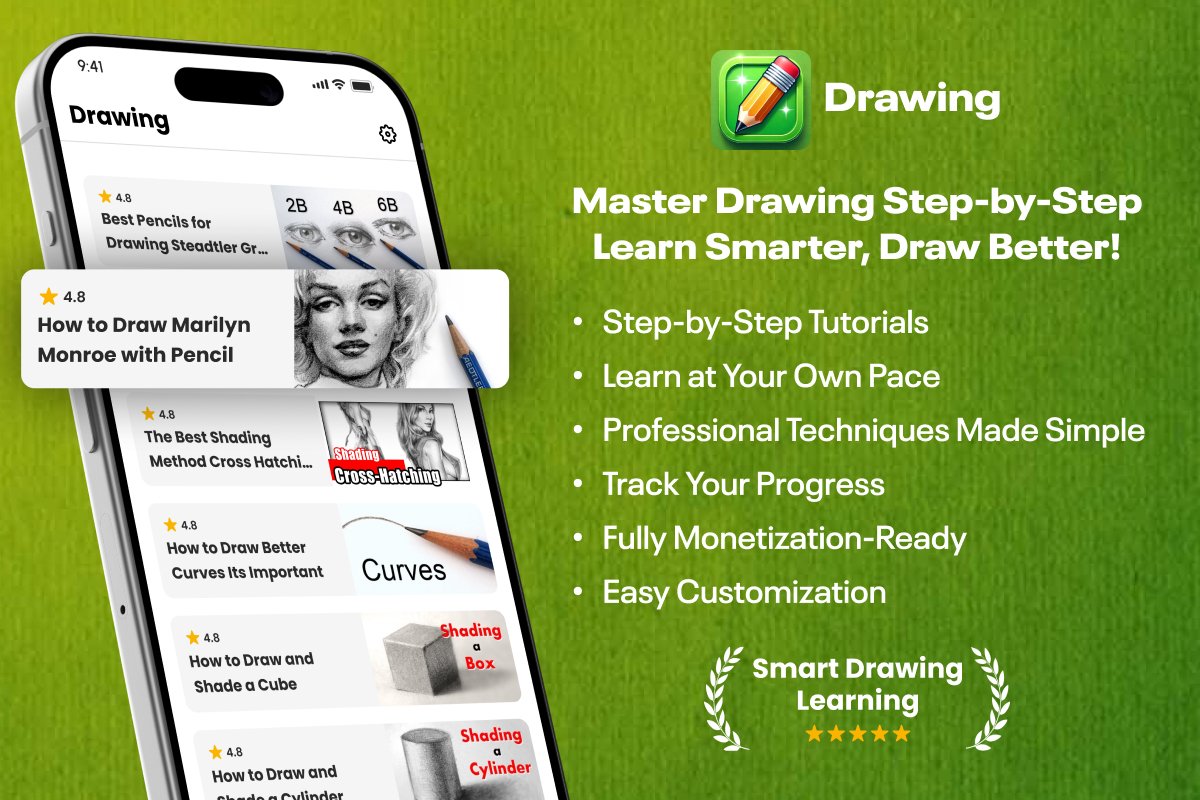
This app is built specifically for step-by-step drawing lessons, covering shading, shapes, curves, anatomy sketches, and realistic pencil drawing techniques. Every screen shown in the screenshots is designed with simplicity and clarity so users can learn without confusion. With smooth navigation, visually rich cards, rating systems, and lesson progress tracking, the Drawing Learning app creates a modern and interactive learning experience.
For Flutter developers, this source code offers a smart shortcut: instead of spending weeks designing screens, organizing lessons, and creating UI components, you start with a complete and working app structure. You can customize colors, lessons, content, icons, and branding very easily. This makes the Drawing Learning code perfect for app creators, educators, entrepreneurs, and developers who want to launch a drawing tutorial app quickly.
Core Features of the Drawing Learning App
The Drawing learning App is designed to make digital art education simple, interactive, and highly engaging for users of all ages. At its core, the app offers a structured step-by-step learning system where beginners can start with basic shapes, lines, and strokes before progressing to advanced techniques such as shading, depth creation, perspectives, and character sketching. Each lesson includes guided tutorials with on-screen instructions, allowing learners to follow along in real time.
The app also features an intuitive drawing canvas equipped with essential tools like brushes, pencils, color palettes, erasers, and layer controls, helping users develop skills similar to professional drawing software. A built-in progress tracker monitors user improvement and unlocks new levels as they master earlier tasks. To inspire creativity, the app provides a library of templates, sample artworks, and challenges that encourage users to practice daily. Additionally, the cloud save option lets users store and access their drawings across devices, ensuring they never lose their work.
With offline learning support, users can practice anytime without an internet connection. Overall, the Drawing Learning App combines learning, creativity, and hands-on practice to help users grow from absolute beginners to confident digital artists.
1. Step-by-Step Drawing Tutorials
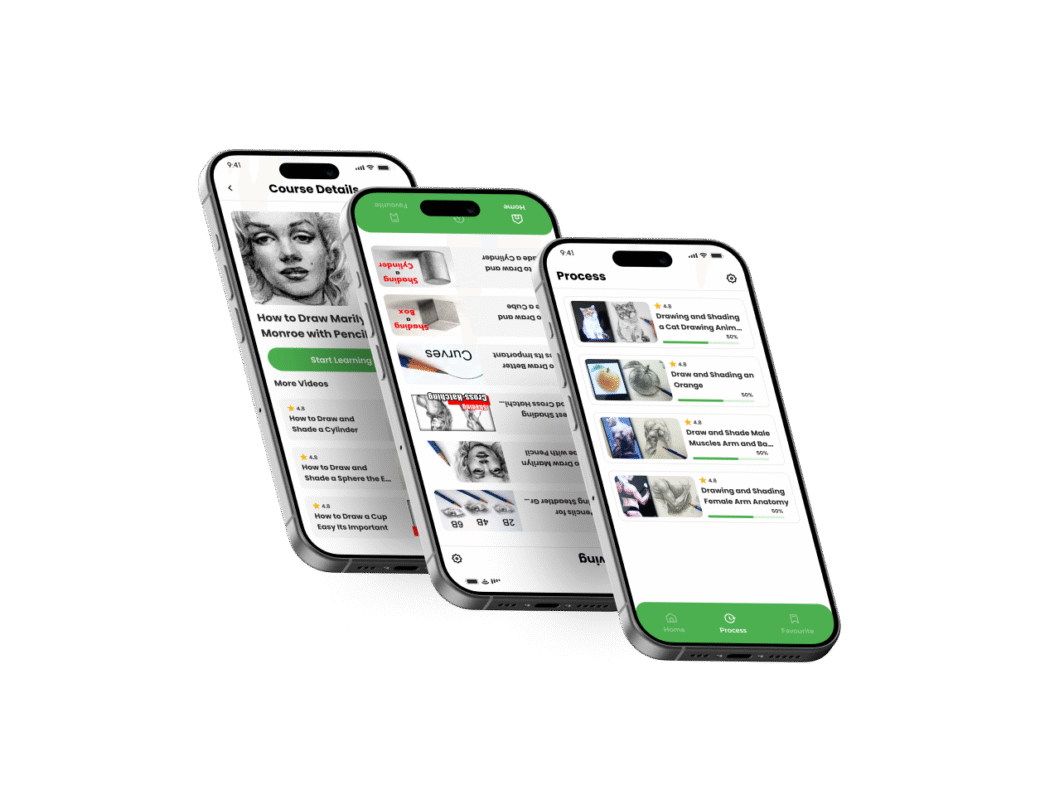
The app includes clearly structured lessons such as shading, curves, anatomy, and object drawing. Each tutorial card includes a title, thumbnail, and rating, helping users choose the lesson they want.
2. Clean Home Screen With Organized Topics
Users can browse drawing categories like shading, curves, and sketching. Each item displays ratings and professionally designed preview images.
3. Lesson Detail Page
The Course Details screen shows the selected lesson, a clean header image, a Start Learning button, and a list of related videos. This makes the learning flow simple and engaging.
4. Progress Tracking Screen
The Process tab displays each lesson with a progress percentage so users can continue exactly where they left off. This helps learners stay motivated and track improvement.
5. Simple Navigation Bar
At the bottom, users can switch between Home, Process, and Favourites with a clean and minimal UI.
6. Modern, Clean UI Built With Flutter
The UI is responsive, beginner-friendly, and easy for developers to customize according to their brand.
7. Rating Display for Each Lesson
Every tutorial has a visible star rating, helping users identify high-quality lessons quickly.
Why Developers Should Choose This Source Code
The Drawing Learning source code is built using Flutter, making it easy for developers to customize, scale, and publish. Whether you want to create an education app, art learning app, or a paid drawing course platform, this code gives you a strong foundation.
Benefits for developers:
Clean architecture
Easy customization
Smooth UI/UX
Ready-to-launch design
Perfect for monetization (ads or premium lessons)
Saves time and reduces development cost
Softmize App Studio always ensures that the code is high-quality, easy to modify, and supported with proper structure so developers can launch apps faster.
What’s Included in Drawing Learning App
Complete Flutter source code
Home screen with structured lessons
Lesson detail page
Tutorial card components
Progress tracking screen
Navigation bar
Rating support
Fully designed UI elements
All screens shown in the app images
Why Choose Softmize App Studio
Softmize App Studio builds high-quality, ready-to-use app source codes designed for both beginners and professional developers. Our apps follow clean UI standards, smooth performance, and easy customization. We focus on educational, utility, productivity, and creative apps that help developers launch their own products quickly.
By choosing Softmize App Studio, you get:
Clean and organized code
Modern Flutter UI
Easy customization
Fast support
High-value templates that save development time
Get Started Today
If you want to build a step-by-step art tutorial app fast, the Drawing learning Flutter source code is the perfect starting point. With clean UI, structured lessons, and a professional design, you can launch your own drawing learning platform in no time.
Visit Softmize App Studio today and get the complete Drawing learning source code.