
Blog
Quran Stories App Code: Build a Powerful & Easy-to-Use Story App
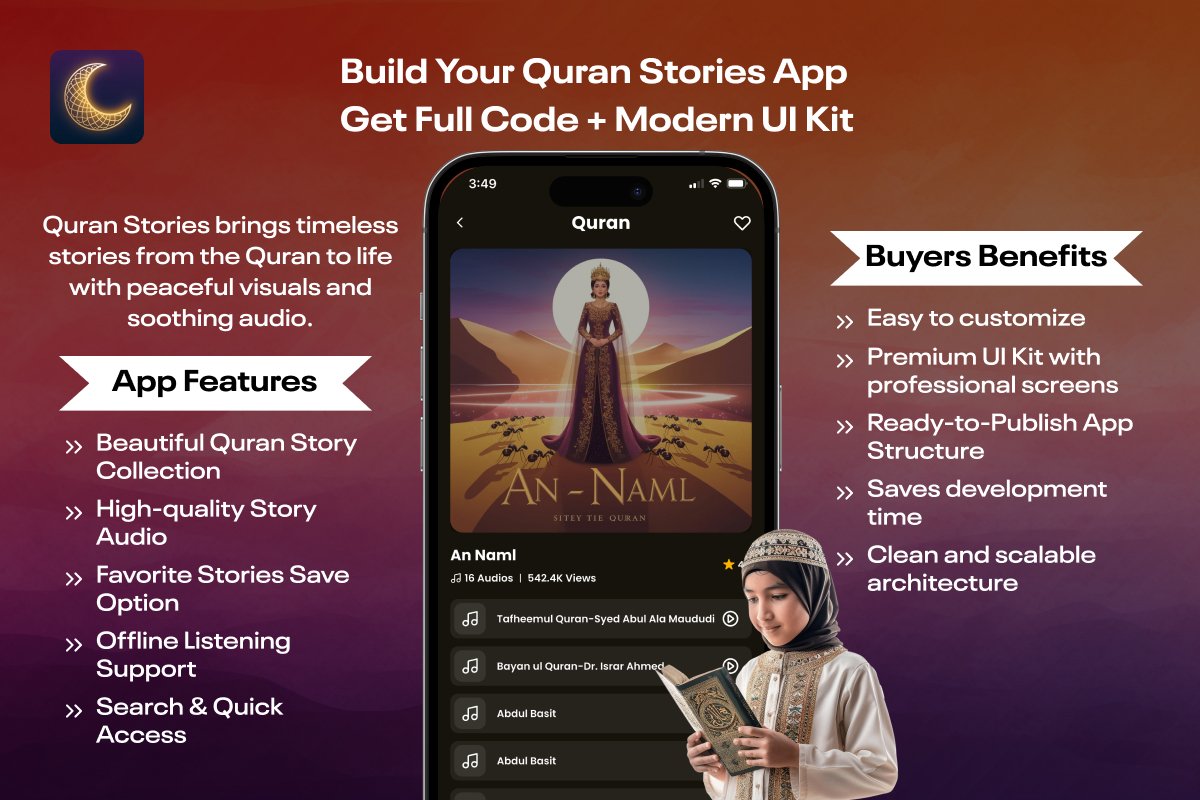
The Quran stories code by Softmize app studio is a complete Flutter-based solution designed for developers who want to build a high-quality Islamic storytelling app without spending weeks on UI design or development. This ready-to-use source code provides a clean structure, modern screens, and smooth audio playback making it ideal for launching a polished Quran Stories app quickly.
The app interface is built to offer users a peaceful and simple way to explore Quaran stories. You can customize story titles, artwork, and audio files with your own content and publish your app on both Android and iOS. With its organized architecture, this source code allows developers to focus more on their content and branding instead of rebuilding components from scratch.
Core Features of the Quran Stories App
The Quran Stories App Code from Softmize app studio includes a complete set of features designed to help users discover, listen, and enjoy Quran stories in a peaceful and organized way. The features are built around clean UI screens, immersive audio playback, and a smooth navigation system that works beautifully on all device sizes.
1. Well-Organized Quran Story Collection
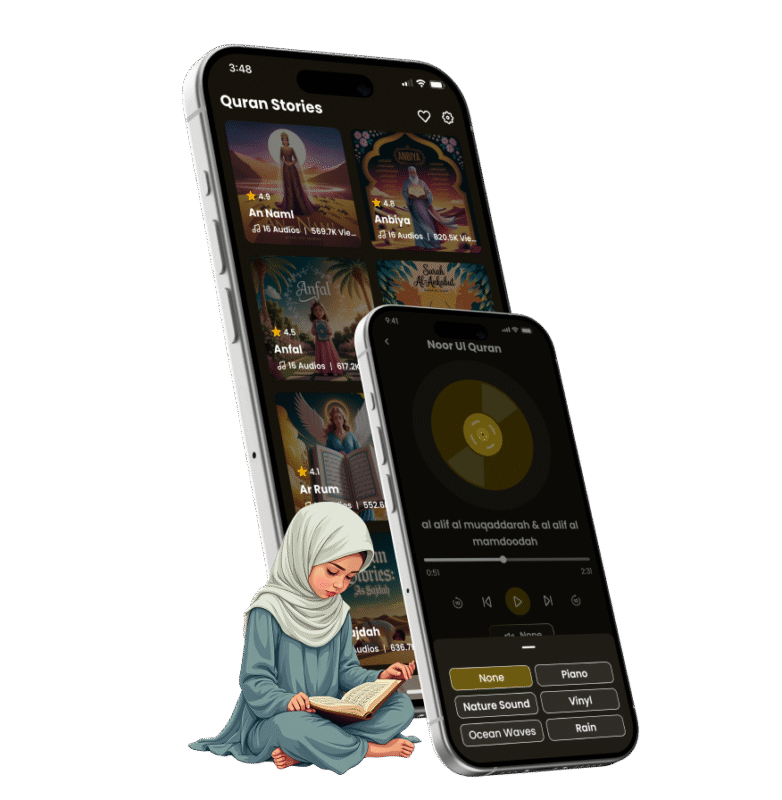
The Quran Stories app provides a beautifully arranged collection of stories, each displayed through a visually appealing artwork card. These artworks help users recognize each story instantly and create an inviting browsing experience. The home screen layout is designed to be simple, clear, and user-friendly, ensuring that users can move through the story collection without confusion. Each card is structured to maintain consistent proportions, spacing, and typography, giving the interface a premium look.
For developers, this section is fully customizable. You can easily modify the story titles, replace the artwork, or add entirely new stories by updating the JSON or list inside the Flutter code. The UI is built responsively, ensuring that story cards look smooth across different screen sizes. This makes the source code ideal for scaling the content in future updates or expanding the story library as needed.
2. Multiple Audio Tracks for Each Story
Every story comes with a list of audio tracks that users can listen to. These audio tracks appear in a clean, scrollable list directly under the featured story artwork. Each track is displayed with a neat icon and title, making it easy for users to identify and choose the audio they prefer. This design helps listeners explore different recitations or versions of the same story.
From a development perspective, adding or replacing audio files is straightforward. The audio list is generated through structured data, so you can easily integrate your own content. The app uses a reliable audio management structure, helping maintain performance even when multiple tracks are included. This feature adds versatility, giving developers the freedom to offer multiple reading styles, narrations, or versions for each story.
3. Immersive Audio Player with Modern UI
The audio playback screen is one of the strongest elements in the Quran stories. It features a centered disc-style animation that provides a calm and modern visual experience for the listener. This animation rotates during playback, creating a soothing effect that matches the spiritual nature of Quran stories. The screen uses a dark, minimal layout that focuses entirely on the audio experience.
Users can control the track easily using play, pause, and seek functions. The timeline slider allows listeners to move to any point in the audio. The track title is displayed clearly, and the bottom area shows additional available audio files related to the story. This ensures that users never lose their place and can continue listening seamlessly.
Developers will appreciate how cleanly the audio player is coded. It uses stable Flutter packages for audio streaming and local playback, ensuring smooth performance. You can add animations, change colors, or adjust layout spacing without affecting the core functionality.
4. Favorites Section for Quick Access
The Favorites section lets users save the stories they love and return to them quickly. Every saved story appears with its corresponding artwork, maintaining the same visual style as the main listing. This creates a familiar and consistent experience across the app.
The Favorites screen shows saved stories in a simple grid format, making it easy for users to browse their personal selection. For app owners, this feature increases user engagement and repeat sessions, as listeners tend to come back to bookmarked stories.
From a development standpoint, the Favorites functionality is built using a clean state-management approach, which makes it easy to maintain and expand. Developers can modify how favorites are stored, whether locally on the device or through cloud storage in future updates.
5. Offline Audio Listening Support
The Quran stories app supports audio listening even when the user is offline. This is extremely useful for individuals who want to enjoy Quran stories during travel or in places where internet access is limited. The offline support ensures that once audio files are available on the device, they can be played without requiring an active connection.
The design supports this feature through stable audio handling and structured file management. Developers can choose which audio files are kept offline or allow users to download tracks for personal listening. The code is structured so developers can manage or extend offline features easily.
6. Smooth and Intuitive App Navigation
The app layout ensures seamless navigation from the story list to the story detail page, audio screen, and favorites. Each screen transition feels natural, helping users enjoy the app without confusion or complexity. The top navigation bar and icons provide a consistent experience across the app.
This structure uses Flutter’s flexible routing system, making it easy for developers to modify routes, add new screens, or reorganize the navigation flow. The clean page structure also reduces confusion when editing or expanding the app in the future.
7. Modern UI Kit Designed for Quran-Based Apps
The entire UI kit included in the source code follows a calm, modern, and spiritual design style. With rich artwork, minimalist controls, and smooth spacing, the user interface enhances the listening experience and keeps the focus on the story narration. The dark and warm color themes are comfortable for long listening sessions, especially at night.
Softmize App Studio designed this UI kit to be easily editable. Colors, fonts, images, and icons can be updated in minutes through centralized theme files. This helps developers customize the app quickly and maintain a consistent design system across all screens.
Boost App Value with High-Quality Visuals
The visual elements in this project add a significant level of polish and professionalism. Each story’s artwork occupies a prominent position, helping users immediately recognize the theme of the story. These visuals contribute to a more immersive experience and leave a memorable impression on users.
For developers with design resources, updating the visuals is straightforward. You can replace images inside the assets folder and adjust the rendering scale without breaking the UI. This allows you to create a unique brand experience while keeping the functionality intact.
Who Can Use the Quran Stories App Source Code?
The Quran Stories App Code is designed for anyone who wants to build a complete Quran storytelling app with minimal effort and maximum flexibility. Whether you’re a beginner, an experienced developer, or someone planning to launch an Islamic content platform, this source code gives you everything you need to create a polished, ready-to-publish app.
This code is ideal for Flutter developers who want a clean, modern structure without spending weeks designing interfaces or building audio systems from scratch. Since the project is fully customizable, developers can easily modify story content, artwork, audio files, themes, and navigation.
It’s also a great fit for app publishers who want to release religious or educational mobile apps on Google Play or the App Store. With the built-in UI Kit and complete screens, you can replace assets, update the content, and publish quickly.
Digital creators, Islamic educators, and businesses offering spiritual or learning-based content can also use this code to build apps for their audience. Because the architecture is scalable, they can expand the story library, add more audio, or introduce new sections anytime.
Overall, this code is perfect for anyone who wants a professionally built Quran Stories app without having to design the entire system themselves. It saves time, reduces development costs, and provides a strong foundation for future updates.
Why This Quran Stories App Code Is Perfect for Flutter Developers
The Quran Stories source code helps developers reduce setup time, avoid UI complexity, and work with a pre-tested structure. Softmize app studio created this template using clean Flutter architecture, making the experience seamless for both beginners and advanced developers.
You can quickly modify themes, replace assets, update story titles, or integrate your own audio library. The user interface is already optimized for readability, calm colors, and intuitive navigation—ideal for educational apps or Islamic content platforms.
This codebase allows you to publish your own Quran-inspired app with professional looks and reliable performance.
What’s Included
Full Flutter source code
Modern UI Kit matching all screens shown
Audio player functionality
Story listing screens
Favorites management
Ready-to-customize assets and files
Clean and scalable Flutter architecture
Why Choose Softmize App Studio?
Softmize App Studio is dedicated to providing developers with high-quality, ready-to-use app source codes that are clean, modern, and easy to customize. Every project is created with a strong focus on design, simplicity, and performance so developers can build professional apps without wasting time on repetitive tasks. With each source code, you receive a complete structure that follows best development practices, helping you launch your project faster and with confidence.
Softmize App Studio understands the challenges developers face while creating apps from scratch—designing UI screens, managing assets, building navigation, organizing code, and ensuring everything works smoothly on both Android and iOS. To solve these problems, every product is built using a clear folder structure, reusable widgets, and consistent styling. This makes it easier for developers to modify the UI, add new content, or expand features without dealing with messy or complicated code.
Another reason developers trust Softmize App Studio is reliability. Each project is tested for performance, ensuring the screens load smoothly and audio or UI components behave as expected. Whether you are customizing themes, updating assets, or integrating your own content, the source code remains stable and flexible.
Choosing Softmize App Studio means you get more than just source code—you get a professional foundation that speeds up your workflow, improves the quality of your final app, and helps you deliver a polished user experience. It’s the perfect partner for developers who want clean code, modern UI, and dependable performance in every project.
Get Started Today
If you’re ready to build a polished and user-friendly Quran stories app, this Flutter source code from Softmize App Studio gives you the perfect head start. Every screen, design element, and feature is already set up for you—so all you need to do is add your own content, customize the visuals, and publish your app. You don’t have to spend weeks designing the UI or setting up audio functions; everything is already organized and ready to use.
With this source code, you can create a complete storytelling experience for your audience and bring meaningful Quran stories to users across the world. The project includes a smooth navigation flow, a clean set of screens, and a modern layout that works beautifully on both Android and iOS devices. This allows you to focus more on improving your content and less on handling technical complexity.
Start today and turn your idea into a complete Quran Stories application. With the ready-made source code from Softmize App Studio, you’re only a few steps away from publishing your own high-quality mobile app.