

Blog
Selfie Light Cam App Source Code: Build a Clean & Bright Selfie App Today
The demand for high-quality camera and selfie apps continues to rise, thanks to social media content creators, vloggers, and smartphone users who want to capture professional and aesthetic selfies instantly. If you’re a developer looking to build a premium selfie camera app without spending months on development and UI refinement, the Selfie Light Cam source code offers a complete solution.
This Flutter-based iOS project is designed with simplicity, polish, and performance in mind. With clean Swift code, reusable components, and a ready-to-publish structure, it empowers developers to create a commercial-grade selfie app quickly and efficiently. By using this template, you eliminate unnecessary development time and can focus directly on branding, monetization, and launching.
Softmize app studio created this project to help developers start and scale mobile app businesses with confidence.
Why Choose Selfie Light Cam for Your Next Project
Most camera templates focus only on capturing photos, but Selfie light cam goes a step further by giving users an enjoyable experience. Its minimal and bright interface encourages users to focus on the most important action — taking great selfies. The app’s layout, animations, and controls are built to be simple, fast, and visually attractive.
Each feature is designed to improve the quality of selfies while keeping the workflow smooth and intuitive. With this codebase, you can deliver a product that users will love without worrying about complicated Swift camera modules.
A Perfect Balance of Functionality and User Experience
Modern users expect selfie camera apps to be beautiful, fast, intuitive, and fun to use. Selfie Light Cam meets this expectation with a clean UI, smooth camera performance, and minimal distractions on screen. Everything users interact with is thoughtfully placed to deliver an effortless selfie-taking experience.
The UI is built to ensure a frictionless flow:
Launch the app
Capture selfie with one click
Customize background or color tone
Save to gallery instantly
There’s no unnecessary complexity, no confusing menus — just simple, delightful interaction.
What Makes Selfie Light Cam Special
This app is built to deliver clear, bright selfies with smooth camera controls and a distraction-free interface. The source code is scalable, easy to customize, and perfect for creating a commercial selfie app on the App Store.
1. One-Click Bright Selfie Capture
The one-click selfie capture feature of selfie light cam is designed to deliver professional-quality selfies instantly. With a single tap, the camera automatically adjusts focus, exposure, and lighting to ensure that every selfie looks bright, clear, and visually appealing. This functionality removes the need for users to manually adjust camera settings, making it ideal for anyone who wants high-quality results without any hassle.
The seamless integration of this feature ensures minimal lag or delay when taking photos, providing a smooth user experience. Developers benefit from a well-structured Swift implementation that handles image capture, lighting adjustments, and autofocus in a modular way, making it easy to customize or extend. This feature is perfect for building apps that prioritize speed, quality, and ease of use, ensuring users consistently produce selfies they can share confidently on social media or save in their galleries.
2. Background Color Customization
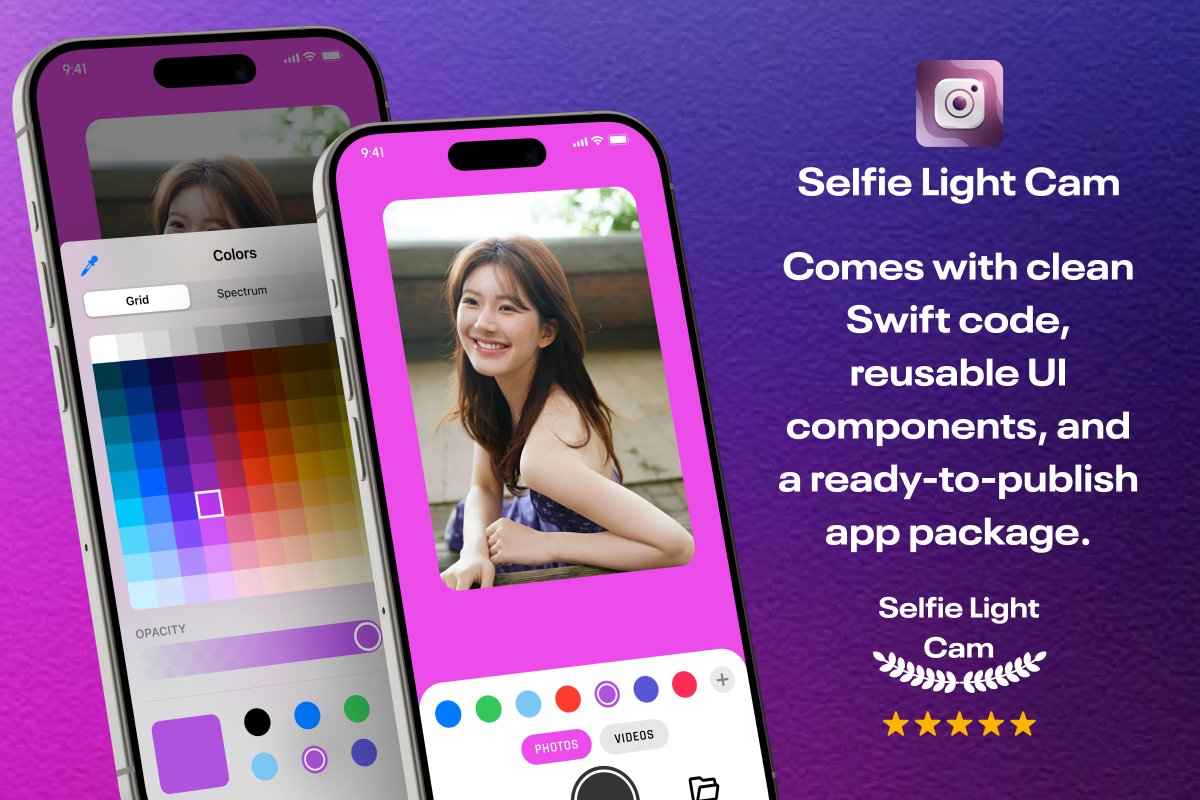
The background color customization feature allows users to enhance their selfies by choosing from multiple preset background colors. It adds a creative touch to every photo, allowing users to match their mood, outfit, or style preferences. This functionality is designed to be intuitive, with a simple row of color options displayed below the camera view for quick selection. From a developer perspective, the feature is built with reusable UI components that make it easy to add new color options or adjust the layout according to app branding.
It enhances the visual appeal of the app and encourages user engagement, as users can experiment with different backgrounds in real time. This feature provides a balance of aesthetic flexibility and simplicity, allowing the app to feel dynamic without overwhelming users with complex controls.
3. Full Color Spectrum Picker
For users who desire precise control over the look of their selfies, the full color spectrum picker is an essential feature. It allows selection of any color shade from a grid, spectrum, or adjustable sliders, giving users the freedom to fine-tune both hue and opacity. This feature enables creative expression, offering endless possibilities for customizing selfies to suit personal style or professional editing needs. From a developer standpoint, the module is built using modular Swift components, allowing easy customization of color ranges, default settings, and UI placement.
It integrates smoothly with the camera view so that changes are reflected in real time, providing instant feedback. This capability not only elevates the visual quality of the app but also increases user retention, as users spend more time experimenting with creative edits before saving or sharing their photos.
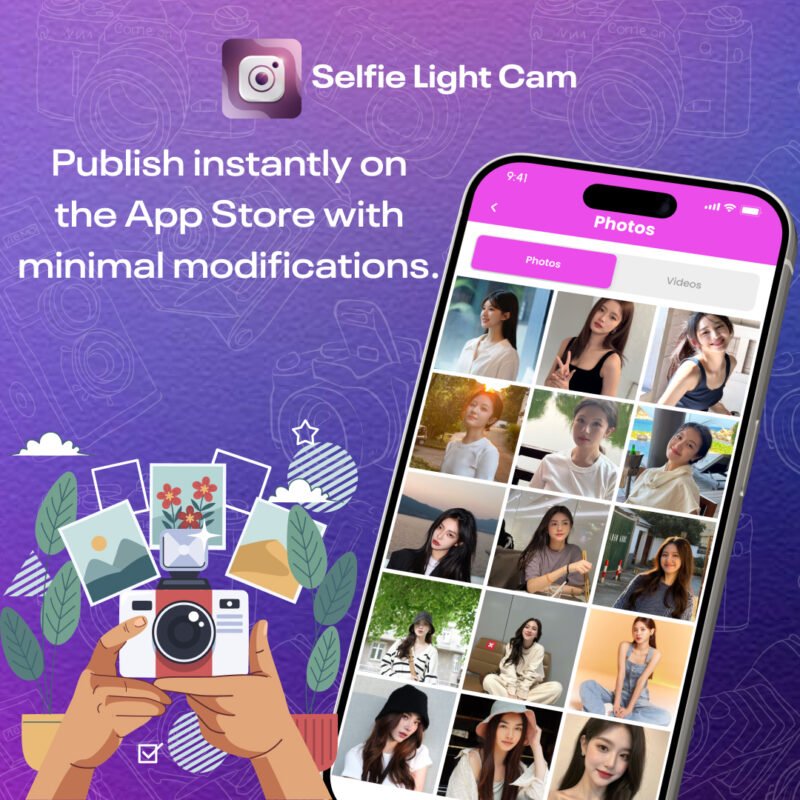
4. High-Quality Photo & Video Gallery
For users who desire precise control over the look of their selfies, the full color spectrum picker is an essential feature. It allows selection of any color shade from a grid, spectrum, or adjustable sliders, giving users the freedom to fine-tune both hue and opacity. This feature enables creative expression, offering endless possibilities for customizing selfies to suit personal style or professional editing needs. From a developer standpoint, the module is built using modular Swift components, allowing easy customization of color ranges, default settings, and UI placement.
It integrates smoothly with the camera view so that changes are reflected in real time, providing instant feedback. This capability not only elevates the visual quality of the app but also increases user retention, as users spend more time experimenting with creative edits before saving or sharing their photos.
5. Clean and Modern User Interface
The user interface of Selfie Light Cam is carefully designed to provide a clean, distraction-free experience. Every element, from buttons to sliders, is strategically placed to make navigation intuitive while keeping the focus on the selfie itself. This minimalistic design reduces clutter and ensures that users can access key features quickly, improving overall usability. Developers can easily modify the UI with a well-structured Swift layout, enabling theme changes, color adjustments, and icon updates without affecting the underlying functionality.
The modern aesthetic enhances the perceived quality of the app, making it feel premium and professional. A thoughtful interface encourages longer user sessions and repeat use, as users feel confident that every photo they take will look polished and visually appealing. The UI serves as both the backbone of user engagement and the foundation for app branding.
A Scalable Foundation for Developers
The selfie light cam source code isn’t just a template — it’s a scalable foundation for building and evolving a commercial camera product.
Under the hood, the code includes:
Clean Swift structure
Reusable UI components
Modular layout system
Lightweight gallery performance
Declarative SwiftUI architecture
Developers can:
Replace UI colors globally in seconds
Swap icons and UI theme to match their brand
Position new features with minimal rework
Integrate monetization (ads, subscription, in-app purchases)
Connect backend or cloud storage if needed
This structure makes it easy to maintain and update the app even as your user base grows.
What’s Included in Selfie Light Cam
Once you purchase the app, you receive:
Complete Selfie Light Cam source code
Swift-based launch-ready iOS project
Background color selector module
Color spectrum picker UI
High-quality photo & video gallery
Full camera screen UI
Documentation for setup and customization
No missing pieces — everything needed to build and publish is included.
Why Developers Prefer Softmize App Studio
Softmize App Studio is committed to helping developers launch apps faster and with more confidence. Every template is built with refined UI, scalable structure, and clean code — making maintenance easy for small teams and solo developers.
When you purchase from softmize app studio, you get:
Premium quality source codes at affordable pricing
Simple and clean app architectures
Ready-to-publish app packages
Developer-friendly documentation
Lifetime usage without any restrictions
Professional templates designed for real business growth
Developers choose Softmize not just for code — but for reliability and long-term support.
Get Started Today
If your goal is to launch a high-quality selfie camera app quickly, the selfie light cam source code gives you everything you need to start strong. Instead of spending months building from scratch, you can customize and publish your commercial-ready app in a fraction of the time.
Turn your camera app idea into a working, polished product with Softmize App Studio and take the next step toward launching a profitable app business.