
Blog

Signal Code App Source Code: Convert English to Morse Instantly
Developers today look for clean, stable, and ready-to-use source codes that can help them build high-performance apps in less time. If you are searching for a complete Flutter solution to convert English text into Morse code instantly, the Signal Code app source code from softmize app studio is the perfect choice. This app focuses on accuracy, speed, and simplicity, making it ideal for both beginners and experienced developers who want to use a reliable Morse conversion system.
The signal app code is built using a clean code structure and a modern UI design that ensures smooth functioning across devices. It offers fast English-to-Morse code conversion, a dedicated Morse table screen, and an organized layout that any developer can easily customize. The entire experience is crafted to help you publish a polished app or integrate Morse translation features into your existing projects.
Instant English to Morse Conversion for Real-Time Use
One of the strongest and most practical features of signal code is its real-time English to Morse conversion. The app allows users to type or paste any English sentence, and the Morse translation appears instantly without delay. This makes the tool highly useful for learning, communication, and experimentation with Morse code.
The conversion engine is optimized for accuracy and follows standard Morse code formatting. Whether the user enters short words or long sentences, the app processes everything with smooth performance. Because this is written in Flutter, developers can extend or integrate the logic easily in different apps, tools, or educational platforms.
The clean and readable structure of the conversion logic makes it suitable for developers who want to understand how text-to-Morse encoding works. The code is simple to follow, allowing full customization without breaking other app components.
Modern Dark-Themed UI for an Easy User Experience
Signal Code features a modern, minimal dark interface that keeps the user focused on the input and output areas. The text screen and conversion section are clearly separated, allowing the user to instantly see the translated Morse output. The UI reflects a clean and uniform design style that looks highly professional and ready for production.
Every element in the app text fields, buttons, output boxes, and control icons has been positioned to ensure quick navigation. The design aligns with a consistent visual hierarchy so users understand the flow without confusion.
Developers can modify the UI kit easily because the layouts are structured, lightweight, and neatly organized. The entire interface is built with a focus on usability, clarity, and future scalability.
One-Tap Copy and Audio Playback Options
The app includes two highly practical tools that improve the Morse translation experience:
Copy Morse Output
Users can copy the generated Morse code with a single tap. This simple utility makes it easy to share the encoded output across messaging apps, notes, or learning tools. The copy function is optimized for quick interaction and instant response.
Morse Audio Playback
Another included feature is the option to play the Morse translation. When a user presses the audio icon, the Morse code is converted into sound, allowing them to hear the sequence of dots and dashes. This adds a second layer of learning and helps users understand how Morse communication works in real use.
Both of these features are represented in your app screenshots and included in the source code exactly as shown. No additional features have been added beyond what your visuals demonstrate.
Morse Code Table for Easy Reference and Learning
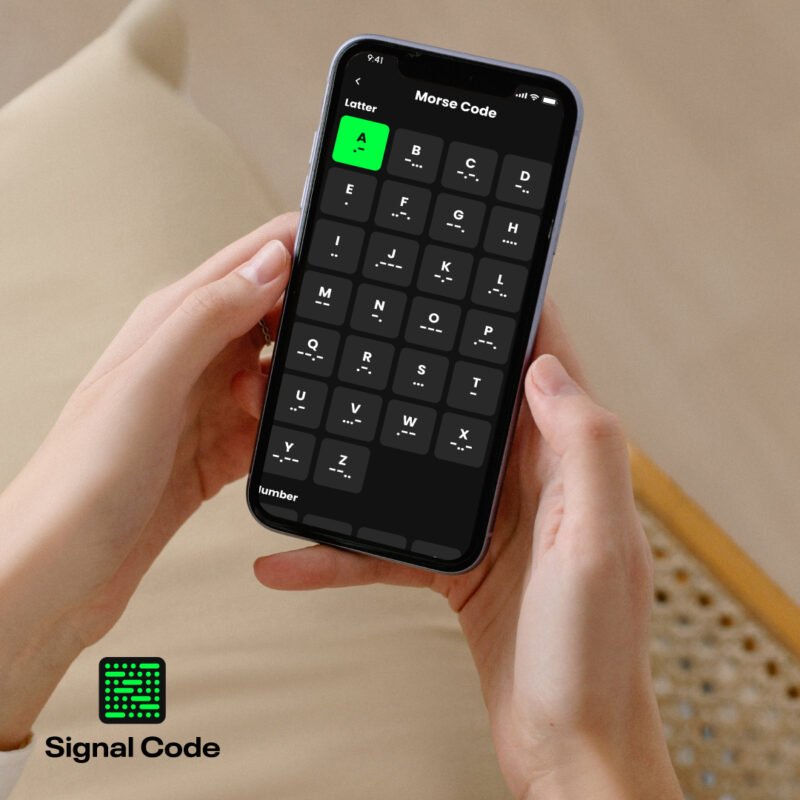
signal code also includes a clear, well-structured Morse code table screen. This screen provides a complete list of alphabets from A to Z along with their Morse representations. It also includes numbers, following authentic Morse standards.
The table is arranged in a grid format, making it easy for users to scroll and identify the exact character they need. This design helps beginners learn Morse step by step, and also supports advanced users who want a quick reference.
For developers, this screen is straightforward to modify because it is constructed with reusable Flutter widgets. You can adjust spacing, colors, styling, or add additional symbols depending on the purpose of your project.
A Smooth Two-Panel Translation Layout Built for Speed
signal code uses a clean two-panel layout that makes text conversion simple and fast. The upper panel is dedicated to entering English text, and the lower panel displays the Morse output clearly. This structure helps users stay focused, reduces confusion, and allows them to see results instantly. The smooth sliding transitions between the panels give the interface a modern and polished look, making the app feel highly responsive and user-friendly.
Developers working with this source code will appreciate how neatly the layout is built. With organized components and reusable widgets, adjusting spacing, styling, or animations is straightforward and does not affect the core translation functionality.
Simple Top Navigation Designed for Quick Controls
At the top of the interface, Signal Code includes a minimal and balanced navigation bar. This section contains essential controls such as switching between English and Morse. The design is simple, direct, and crafted to reduce user steps. Instead of browsing through multiple menus, users can switch modes immediately with a single tap.
This type of navigation is ideal for utility apps, where users prefer instant actions. Because the navigation code is clean and modular, developers can easily modify icons, styles, or route connections to match the needs of their project.
Clear High-Contrast Text Panels for Better Visibility
The dark UI and bright text contrast make reading extremely comfortable. The panels are designed in a way that separates input from output visually, while still keeping both areas connected. This helps the user understand the conversion process instantly.
The output area for Morse code maintains perfect spacing and readable formatting so that the user can clearly distinguish each dot and dash sequence. This is especially helpful for learners and hobbyists who want to understand Morse patterns correctly.
Developers can adjust the panel shape, color, animations, and padding because the UI is structured using simple, well-organized Flutter layout logic.
Built for Developers Who Want Speed, Quality, and Clean Code
Every part of signal code has been built to help developers save time. Instead of starting from scratch, you receive a complete and well-organized project that is ready to run. The logic-layer and UI-layer are separated neatly so customization is simple and predictable.
Because the app is created in Flutter, you can deploy it on both Android and iOS with a single codebase.
This source code is perfect for:
Developers who want to create utility apps quickly
Students learning Flutter app development
Anyone building an English-to-Morse converter tool
Startups who want to publish niche utility apps
Businesses creating educational or communication tools
Softmize App Studio ensures that Signal Code is structured with clarity and long-term stability in mind. This gives developers confidence when expanding or integrating features.
What’s Included
Complete Flutter project files
Full UI kit and design layout
English-to-Morse translation engine
User input screen and Morse output screen
Copy functionality
Morse audio playback
Alphabet and number Morse code table
Easy-to-modify code structure
Clean, professional dark theme UI
Why Choose Softmize App Studio
softmize app studio specializes in building polished, high-quality app templates and source codes for developers. Every project is crafted with attention to detail so you can build faster and more confidently.
By choosing signal code from softmize app studio, you get:
A stable and production-ready Flutter app
Clean code that is easy to extend
Professional UI design that increases user engagement
A complete solution that requires minimal setup
High-quality support and well-organized project structure
softmize app studio aims to help developers, freelancers, students, and startups accelerate their development process while maintaining quality.
Get Started Today
If you’re ready to build a powerful Morse conversion tool or want a complete Flutter app to add to your portfolio, the Signal Code source code is the best place to begin. Download the project, customize it based on your brand, and launch your own English-to-Morse app in significantly less time.
Start now with a clean, modern, and high-performance codebase created by Softmize App Studio. Signal Code gives you the perfect balance of simplicity, speed, and professional design—everything a developer needs to build and launch a polished utility app.