
Blog
Top Tape Measure App Code for Accurate AR Measuring
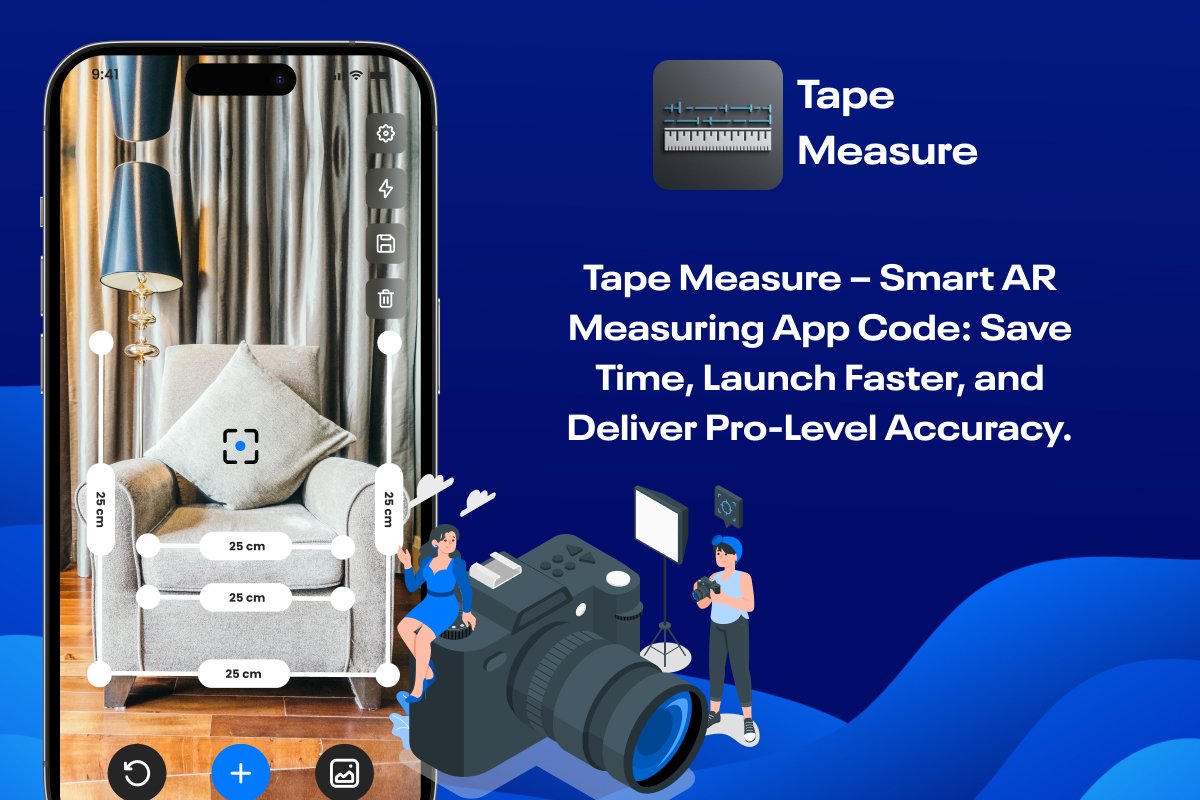
Building a smart AR measuring app no longer requires months of coding and testing. With the Tape Measure Flutter Source Code from softmize app studio, developers can instantly launch a high-accuracy measuring tool that works directly through the phone camera. This digital Tape measure system lets users measure objects in real time by placing AR points on furniture, walls, decor, artwork, and everyday items.
If you’re a developer looking for a ready-made, modern, and precise measurement app, this is one of the best solutions available today. Since the project is built in Flutter, you can publish on both iOS and Android with practically no extra effort.
Why Developers Love This Tape Measure Source Code
The Tape Measure app code gives you everything you need to build a production-ready measuring experience without creating the system from scratch. Instead of struggling with AR frameworks or calibration issues, you get a fully working setup that measures instantly and displays accurate results on the screen.
Developers who use this source code save hours of debugging, UI setup, and layout design. softmize app studio has already done the heavy lifting, allowing you to focus on customizing features, branding, and adding monetization.
This makes the tape measure app code ideal for developers who want faster launch times, lower development costs, and a powerful measuring tool that looks and feels professional.
Core Features of the Tape Measure App
The Tape measure app offers a powerful set of features that make digital measuring easy for every user. With an advanced AR camera system, the app lets users measure any object through their phone by placing virtual points directly on real surfaces. It supports measurements in all directions, allowing users to capture height, width, and side lengths with clear labels that appear on the screen in real time. As users move or adjust the points, the measurement updates instantly for accurate results. The app also provides a photo measurement mode where users can upload an image and place points later whenever needed. With its clean and simple interface, the Tape Measure app helps users measure furniture, walls, frames, and many everyday items quickly and confidently.
1. AR Based Camera Measurement System
The AR Based Camera Measurement System is the core technology that makes your Tape Measure App highly useful and modern. With this system, users can point their smartphone camera toward any object and instantly begin measuring without needing a physical tape. Once the camera detects the real world surface, the AR engine places accurate virtual measurement points directly on the object. Users simply tap to set the first point and then move their phone to set the second point, allowing the app to calculate the exact distance between both positions. This makes it extremely easy to measure walls, doors, furniture, household items, or even large spaces. Because the measurements are displayed on top of the object itself, users get a clear understanding of the actual size without confusion.
This technology is helpful for interior design planning, room arrangement, buying furniture that fits properly, or even for quick daily tasks like checking the size of a box or shelf. The AR system adjusts smoothly with movement, offering reliable accuracy and a very natural measuring experience. For developers purchasing this code, the AR functionality is already integrated in a structured and simple way, meaning they can build advanced measuring tools without needing deep AR knowledge. It saves time, accelerates development, and provides a professional feature that users love.
2. Multi-Directional Measurements
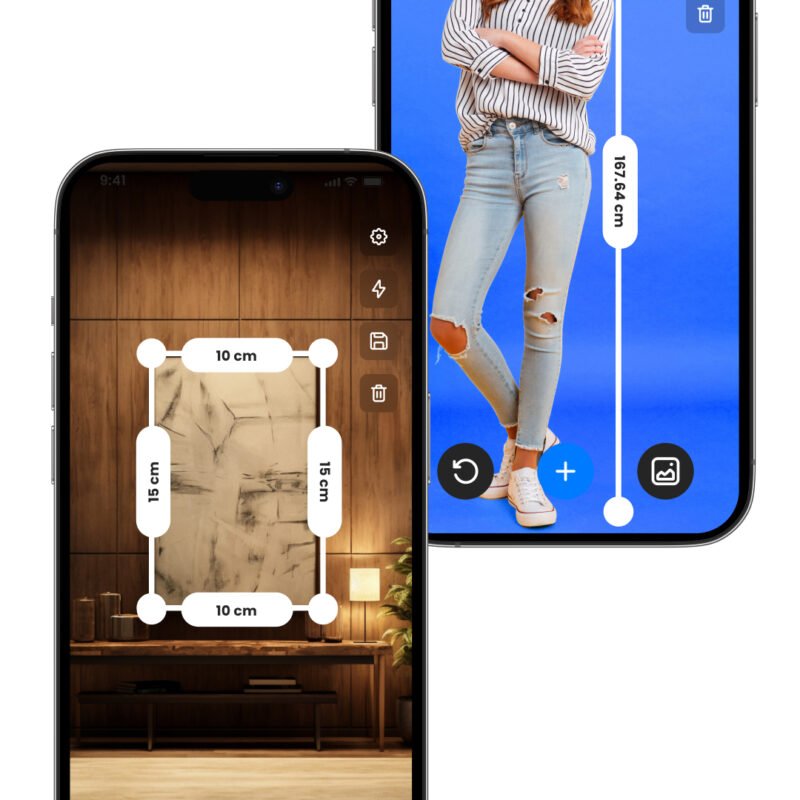
The Multi Direction Measurement System allows users to measure objects from every possible angle. This includes height, width, depth, vertical sides, horizontal sides, and diagonal measurements. Users can place multiple measurement points on a single object and calculate all sides without touching or moving the object. This is especially useful for users who need to obtain complete dimensions, such as when checking the size of furniture, assessing available space in a room, or comparing different items. Since the system supports multiple points, users can build a chain of measurements on the same object for greater accuracy.
This feature makes the Tape Measure App feel more powerful than basic AR measurement apps that only measure straight lines. Users can measure one side, then add another point to measure a different side, and continue until they have mapped the full shape. Each new measurement updates in real time and stays displayed so users can review all dimensions together. This level of flexibility is extremely valuable for home improvement, DIY projects, professional designers, architects, contractors, or even students working with physical models.
For developers, this feature offers a complete measuring workflow already built inside the app. They can easily customize the UI, change measurement styles, or modify how multiple points behave. The Multi Direction Measurement System brings professional measuring capabilities to an easy digital interface that requires no additional hardware.
3. Real-Time Measurement Labels on Screen
The Real Time Measurement Labels feature helps users clearly understand every measurement they take by displaying the values directly on the object. As users place AR points or move their phone to refine the measurement, the displayed value updates instantly. This immediate feedback ensures that users always know the exact size at the moment they adjust a point. It eliminates guesswork and makes the measurement process fast, smooth, and highly accurate.
These labels appear next to the virtual points so the user can easily see which value belongs to which side. The clean and readable design ensures that even multiple measurements on the same object remain easy to identify. If a measurement point is placed incorrectly or slightly shifted, users can immediately see the incorrect label and reposition the point. This prevents errors and makes the app reliable for measurements that must be precise.
Real Time Measurement Labels are especially useful for tasks where quick decision making is important, such as choosing the right furniture size, planning interior decoration, checking object fit, or comparing different items. For developers, this feature is already optimized to update smoothly without graphical lag, which helps create a premium user experience. They can modify label styles, fonts, or colors based on branding needs while maintaining a polished measurement flow.
4. Photo Measurement Mode
Photo Measurement Mode allows users to measure objects from a saved picture instead of the live camera. This feature is extremely convenient because users do not always have time to measure in real time. They may want to capture a picture of a wall, a frame, a room, or an object and measure it later when they are free. In this mode, users can either click a new photo or select an existing image from the gallery, and then place AR style points on the picture to calculate dimensions.
The interface in photo mode works very similar to the camera measurement mode, which ensures a smooth and comfortable experience. Users can add points anywhere on the picture and adjust them to get precise measurements. This mode is helpful for interior design planning, comparing sizes of objects, preparing for shopping decisions, or documenting dimensions for later reference. Even professionals such as architects, designers, and contractors can use this mode for quick project planning and remote reviews.
For developers, Photo Measurement Mode adds extra value to the source code because it expands the app’s usage beyond live AR scanning. This makes the app more versatile and increases user engagement. The mode is already structured with easy-to-modify components, so developers can enhance or redesign it without difficulty. It adds a powerful second option for measuring, making the Tape measure app more complete and feature rich.
5. Clean and Simple Measurement Interface
The Tape Measure App features a clean and simple interface designed to make the measuring experience effortless for all users. Every control is positioned in a way that feels natural and easy to understand. The bottom section contains essential tools such as undo, add point, and gallery selection, allowing quick access without disrupting the measuring process. The right side provides camera options and delete actions, keeping the interface organized and clutter free.
The measurement labels and virtual points appear neatly on the object, ensuring that the user always has a clear view of what they are measuring. Even when multiple points are placed, the screen remains tidy and easy to read. The smooth transitions between camera mode and photo mode help users stay comfortable with the app because the visual layout remains consistent.
This clean UI is especially helpful for beginners who may be using a measurement app for the first time. They can understand the workflow within seconds and complete their tasks without confusion. Professionals also benefit from this simple interface because it allows faster measuring with fewer interruptions. For developers, the UI section of the source code is well structured, making it easy to apply custom branding, change colors, update buttons, or add new features. A clean interface creates a premium feel and improves user satisfaction, which helps developers deliver a polished and market ready product.
How This Tape Measure App Helps Your Users
This digital Tape measure is not just a utility tool—it’s a problem-solver. People no longer need physical tape measures, guesswork, or manual measurements. Whether they want to measure a wall before buying a frame, check furniture fit, or estimate object size, this app makes it possible with only their phone.
Because the experience is so smooth, developers using this code can build apps for home design, real estate, DIY tools, interior decoration, furniture shopping, and more.
Ideal for Developers Wanting a Fast Production Launch
Softmize App Studio created this Flutter source code to help developers launch a high-quality app without writing complex AR logic. Instead of building everything from the ground up, you receive:
A polished UI
Working measurement logic
AR point placement
Clean Flutter code structure
A ready-to-publish project
You can rebrand it, add themes, insert in-app purchases, or connect it with other tools—everything is customizable.
Who Can Use the Tape Measure App Source Code
Developers who want to build an AR based measuring app quickly without creating everything from zero.
Flutter developers who want to add real world AR measurement features to their portfolio or client projects.
Startups planning to launch a utility tool for home measurement, furniture fitting and interior planning.
Interior designers and agencies who want to offer a digital measuring solution to their customers.
E commerce businesses that want users to measure spaces before buying products.
Freelancers and students who need a ready made AR project to learn, customize and publish.
Companies looking for a strong, scalable and user friendly measurement app for Android and iOS.
What’s Included in Tape Measure App
Complete Tape Measure Flutter source code
Full AR camera measuring system
Multi-point digital measurement tools
Photo measurement mode
Clean and modern UI
Well-organized project files
Ready-to-modify Flutter structure
Why Developers Prefer Softmize App Studio
Softmize App Studio is known for providing high-quality app source codes built for performance and long-term scalability. Every project is clean, responsive, and easy to customize. Whether you’re a beginner or an experienced developer, you will find this code simple to understand and modify.
We focus on delivering real value—professional UI design, stable performance, and code you can trust. Choosing softmize app studio means choosing faster app development, less workload, and a smooth launch process.
Get Started Today
If you’re ready to build a powerful and accurate AR measuring app, the Tape Measure Flutter Source Code is the perfect starting point. Save development time, reduce effort, and give your users a tool they’ll rely on daily.
Visit Softmize App Studio today and get the Tape measure source code to start building your next successful app.