
Blog

Truck GPS Navigation App for iOS – Complete Source Code to Launch Instantly
The Truck GPS Navigation App for iOS is a ready-to-use, fully customizable navigation and tracking solution built for developers, logistics startups, and entrepreneurs who want to create their own truck GPS navigation app — fast, easily, and affordably.
Developed with Apple’s latest frameworks and precision-based GPS algorithms, this iOS source code lets you build a professional truck Navigation and fleet-management system with minimal effort.
Whether you’re developing for your logistics business, a client project, or building an App Store–ready trucking solution, this Truck GPS template gives you a powerful head start.
Why This Truck GPS App Is a Game-Changer
Trucking companies today face challenges like route optimization, driver safety, and real-time fleet visibility.
Our Truck GPS Navigation App for iOS solves them all — turning any iPhone or iPad into a smart truck navigation and tracking system.
Drivers can plan optimized delivery routes, avoid restricted zones, and monitor vehicle movement in real time.
Fleet managers can track trucks remotely, reduce idle time, and improve delivery performance.
Developers can easily customize and rebrand the app for their own trucking business or client projects.
No need to build from scratch — the entire project is production-ready and App Store-compliant.
With advanced navigation algorithms, offline maps, and multi-truck management, this app isn’t just another GPS tool — it’s a complete logistics navigation platform for modern transport businesses.
Key Features
- Smart Truck Navigation System
Real-time route guidance optimized for heavy vehicles and long-distance transport.
2. Accurate GPS Tracking
High-precision tracking using Apple’s CoreLocation framework for accurate real-world positioning.
3. Offline Map Access
Download and use maps even in remote areas or highways without an internet connection.
4. Route Planning & Restrictions
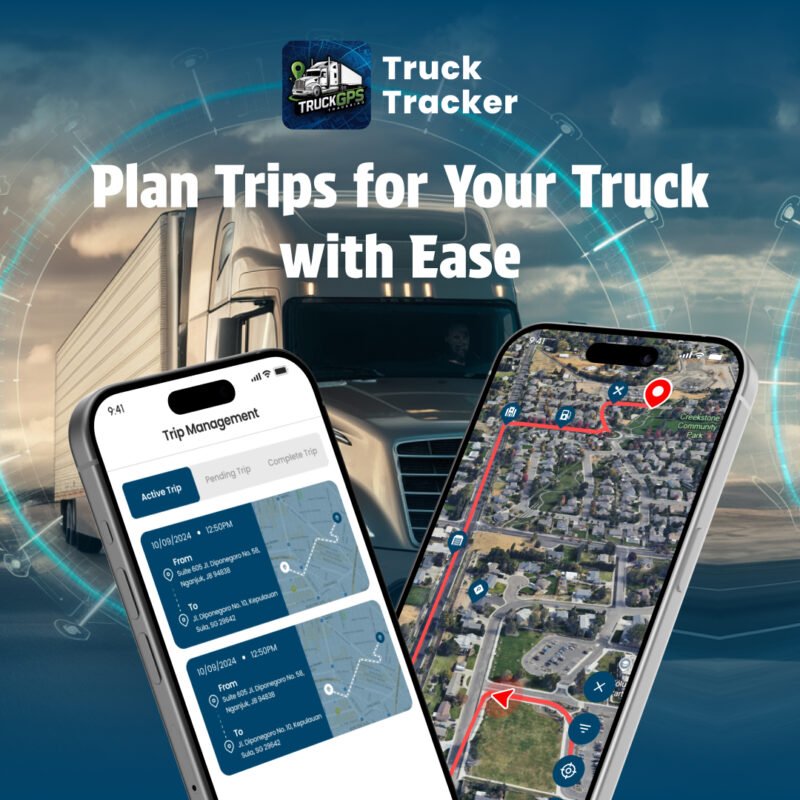
Plan safe routes for large trucks — automatically avoid bridges, tunnels, and restricted roads.
5. Waypoint & Route History
Save, edit, and re-use delivery routes with complete trip history and map visualization.
6. Multi-Truck Management
Track multiple trucks and drivers under one dashboard — ideal for logistics fleets.
7. Customizable UI & Branding
Easily change app name, color palette, logo, and icon to match your company brand.
8. Analytics Dashboard
View distance, time, and route performance data to improve fleet productivity.
9. Battery-Optimized GPS Engine
Designed for long-distance operations with minimal power consumption.
10. App Store–Ready iOS Source Code
Fully documented and built in Swift — ready to test, modify, and publish instantly.
Why Purchase This Truck GPS iOS Source Code
- Launch Your Own App Faster
Skip months of development. Get a production-ready project that can go live in hours.
2. Save Development Time & Cost
No need to hire expensive developers — buy once, customize, and publish.
3. Fully Customizable
Modify every element — UI, text, icons, maps, APIs — to match your business needs.
4. Perfect for Developers & Agencies
Ideal for freelancers, software studios, and logistics startups building custom GPS apps.
5. For Logistics Companies & Truck Owners
Monitor fleet, plan routes, reduce fuel costs, and ensure on-time deliveries.
6. Scalable Foundation
Add cloud sync, driver reports, or live dispatching features anytime.
7. Clean, Modular Codebase
Built with Swift and clean architecture — easy to maintain, upgrade, and expand.
8. Monetization-Ready
Add in-app purchases, subscription plans, or integrate with ad networks.
How It Works (Quick Overview)
Purchase & Download – Get instant access to the Xcode project and full documentation.
Customize the App – Change assets, theme, and colors to reflect your brand.
Configure Maps & API Keys – Add Apple Maps or any compatible navigation SDK.
Test in Xcode – Run on your iPhone or iPad to verify tracking and navigation.
Publish to App Store – Upload and launch under your own brand name.
Who Can Use This App Source Code
iOS Developers: Build and launch professional GPS apps in record time.
Fleet Managers: Monitor and optimize truck routes with real-time data.
Logistics Startups: Offer your own branded GPS navigation app to clients.
Agencies & Freelancers: Customize and resell the template under multiple brands.
Truck Owners: Track and manage your vehicles directly from your iPhone.
Why Choose Softmize App Studio?
Softmize App Studio is dedicated to providing developers with high-quality, ready-to-use app source codes that are clean, modern, and easy to customize. Every project is created with a strong focus on design, simplicity, and performance so developers can build professional apps without wasting time on repetitive tasks. With each source code, you receive a complete structure that follows best development practices, helping you launch your project faster and with confidence.
Softmize App Studio understands the challenges developers face while creating apps from scratch—designing UI screens, managing assets, building navigation, organizing code, and ensuring everything works smoothly on both Android and iOS. To solve these problems, every product is built using a clear folder structure, reusable widgets, and consistent styling. This makes it easier for developers to modify the UI, add new content, or expand features without dealing with messy or complicated code.
Another reason developers trust Softmize App Studio is reliability. Each project is tested for performance, ensuring the screens load smoothly and audio or UI components behave as expected. Whether you are customizing themes, updating assets, or integrating your own content, the source code remains stable and flexible.
Choosing Softmize App Studio means you get more than just source code you get a professional foundation that speeds up your workflow, improves the quality of your final app, and helps you deliver a polished user experience. It’s the perfect partner for developers who want clean code, modern UI, and dependable performance in every project.
Get Started Today...
If you’re ready to build a polished and user-friendly Truck Tracker app, this iOS source code from Softmize App Studio gives you the perfect head start. Every screen, design element, and feature is already set up for you—so all you need to do is add your own content, customize the visuals, and publish your app. You don’t have to spend weeks designing the UI or setting up audio functions; everything is already organized and ready to use.
With this source code, you can create a complete storytelling experience for your audience and bring meaningful Truck Tracker to users across the world. The project includes a smooth navigation flow, a clean set of screens, and a modern layout that works beautifully on both Android and iOS devices. This allows you to focus more on improving your content and less on handling technical complexity.
Start today and turn your idea into a complete Truck Tracker application. With the ready-made source code from Softmize App Studio, you’re only a few steps away from publishing your own high-quality mobile app.